Rudy Ooms posted: "This time a small blog, this blog will show you when reinstalling an existing device and enrolling it into autopilot white-glove could get you in trouble sometimes. No red screen like you would expect like I was talking about in this previous blog. This"
This time a small blog, this blog will show you when reinstalling an existing device and enrolling it into autopilot white-glove could get you in trouble sometimes.
No red screen like you would expect like I was talking about in this previous blog.
This week we were asked to reinstall some existing Azure Ad / Intune enrolled devices before they were handed to some new employees, so we did.
Before we reinstalled the device, we made sure the device was prepared to be enrolled with Autopilot White glove. As shown in the blog above, we made sure the TPM wasn't going to haunt us this time. We also made sure the device hash was still available in intune and an autopilot profile was attached.
So we reinstalled the devices and started the Autopilot White glove (Autopilot for pre-provisioned deployment).
But just within a few seconds after checking if a deployment profile was targetted this error popped up: 0x80180022
I guess we need to do some troubleshooting, pressing shift + f10 to get a cmd in the system context and opening google would be the first things to start with.
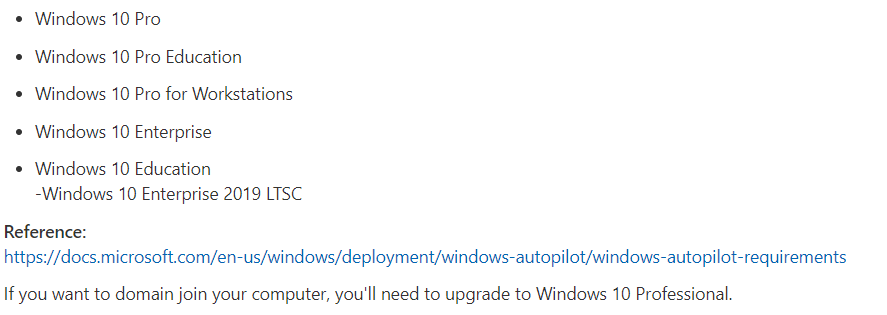
I can show you all kinds of troubleshooting stuff, but to be honest, when googling this error within a few seconds I knew the problem: The device being provisioned is running Windows Home Edition.
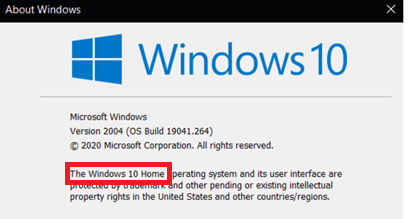
Huh? That's strange, we just reinstalled the device with Windows 10 Pro. At least that's what we thought. To be sure we opened WinVer
As shown above, it's indeed Windows 10 Home and of course, Windows 10 home is of course not supported!
But what happened? The device had a valid purchased Windows 10 pro license. Apparently, the device itself had an embedded Windows 10 Home License. Let's take a closer look at what happens when you are installing Windows 10 and what we choose.
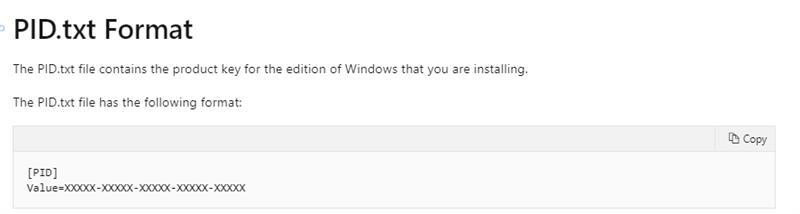
Let's start with the first option, if a PID.txt is found in the sources installation media, it would ignore all the next options and will use the version which corresponds to the product key you configured.
So how to configure the PID.txt?
The value has to contain the generic product for Windows 10 Pro: VK7JG-XXXXX-XXXXX-XXXXX-XXXXX
2.UEFI
If no PID.txt was found it will try to detect the OEM product key which could be embedded in the UEFI.
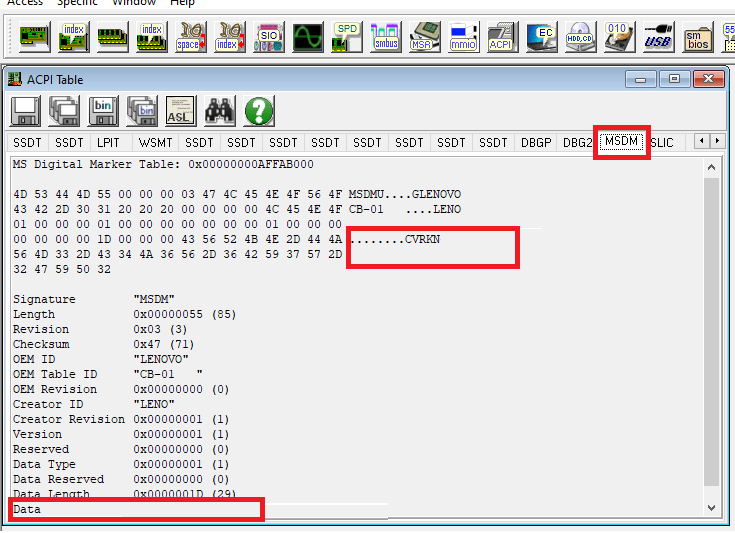
The Locked Preinstallation (SLP) Product Key resides with a Microsoft Digital Marker (MSDM) Advanced Configuration and Power Interface (ACPI) table embedded in the Unified Extensive Firmware Interface (UEFI) BIOS
Some fancy words I guess… let's open RWEverything and take a look
When installed, first you need to click on Access ACPI Tables. When everything loads, you can click on MSDM I mentioned in the fancy words.
You will notice the product key will be shown in 2 places.
When you don't want to download RWeverything, just run this simple CMD command:
wmic path softwarelicensingservice get OA3xOriginalProductKey
3.Manually enter the product key
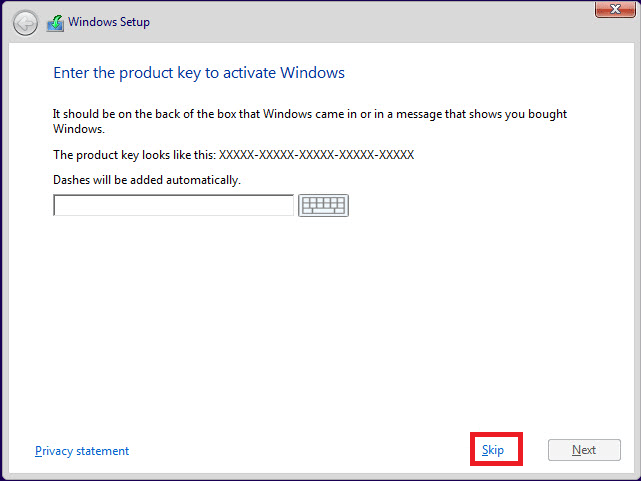
I guess this one, needs no further explanation, you could enter the product key when you will be prompted to enter it or just press skip.
4. Home or Pro question
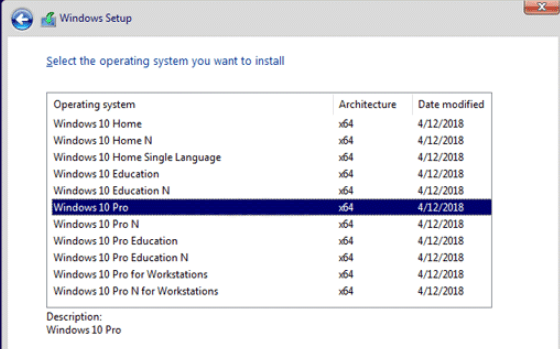
When all other options fail, you will be prompted to select the version you want to install. If one of the earlier options was successful, this one will be skipped
5.So what's our Choice?
We chose the pid.txt option for now because we already had reinstalled the device and it had a valid Windows 10 Pro license even when the device itself had a Windows 10 Home license embedded.
Of course, the customer is using Microsoft 365 Business Premium licenses. When you join your device to Azure Ad, your window 10 device is automatically changed to Windows 10 business as part of the license.
But why reinstalling an existing enrolled device with a USB stick when you have way better options? One of them would be to use the Autopilot reset option or a fresh start (when data exist outside the user profile)
I showed you all the options you have to reset or wipe a device in this blog.
6.Checking the device before Autopilot
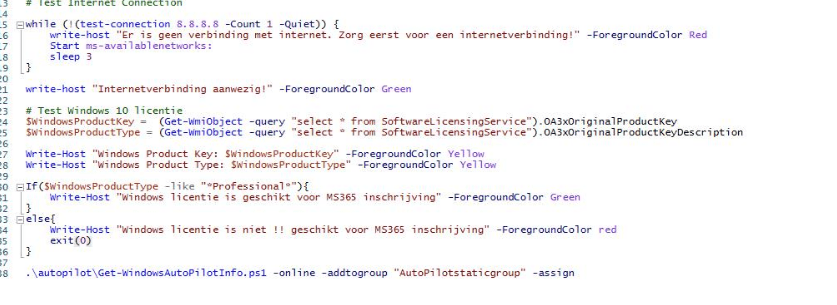
Prior to enrolling your device with Autopilot, you could add a check for yourself to test if the build-in Windows 10 Product Type is Windows 10 Professional. This is an example you can use before you launch Autopilot
Conclusion
When you don't want to get angry when you end up with a Windows 10 home installation make sure your device is always installed with Windows 10 Pro. When your device has an embedded Home license you could use the PID.txt option.
But beware make sure you check with your licensing partner if you are licensing your devices the right way! I guess they will shoot you for it when not using the right licenses
Please note: As I showed you in the blog I mentioned earlier. When you want to reset an existing azure ad enrolled device, just use the fresh start or autopilot reset option!!
SunTec India posted: " Give your users an engaging and comfortable reading experience with our fantastic Fixed Layout conversion services. We understand how important role content plays in attracting users to the business platform. And to help you out, we have come up with"
Give your users an engaging and comfortable reading experience with our fantastic Fixed Layout conversion services. We understand how important role content plays in attracting users to the business platform. And to help you out, we have come up with the most excellent and appealing services that lock texts, images, and animations and make your content out-of-the-box for your end-users. We have a dedicated team of experts who will help you transform your online content, boost your user's reach, and increase engagement. A fixed layout in ePUB format lets your users zoom in on the content and images, giving a fantastic reading experience. So what are you waiting for? Offer your end-reader an enormous opportunity to explore your content innovatively. Hire fixed-layout ePUB services from SunTecIndia and create a fantastic eBook with supreme designs and layouts. From advanced custom fonts, multiple device and platform support, and designs, you will find a plethora of outstanding services with us.
Murray Bader posted: "You may use the VPN rated #1 for Britain without having limits for per month—perfect for any person hoping to stay anonymous on the net for the duration of their trip to the united kingdom. NordVPN is offering a completely-featured danger-no cost thirty-w"
You may use the VPN rated #1 for Britain without having limits for per month—perfect for any person hoping to stay anonymous on the net for the duration of their trip to the united kingdom. NordVPN is offering a completely-featured danger-no cost thirty-working day trial in case you enroll at this site. Our VPN consumer […]
Swen Isbell posted: "The ideal no cost VPNs present 10GB a month, or 500MB every day for free. This provides nearly enough for light-weight streaming all over the month, or perhaps a shorter high-depth duration of streaming. Android user that appreciates you'll be utilizing "
The ideal no cost VPNs present 10GB a month, or 500MB every day for free. This provides nearly enough for light-weight streaming all over the month, or perhaps a shorter high-depth duration of streaming. Android user that appreciates you'll be utilizing the VPN often on your cellphone? Open up the application and it appears much […]
Alena Kuhn posted: "You need to do In order for you your Amazon Firestick to work everywhere. If You will need to travel a great deal or Are living overseas, you gained't have the capacity to access the material you're subscribed to Until you do have a VPN on your own Firest"
You need to do In order for you your Amazon Firestick to work everywhere. If You will need to travel a great deal or Are living overseas, you gained't have the capacity to access the material you're subscribed to Until you do have a VPN on your own Firestick. The Premium Variation provides use of […]






 WordPress.com


